LangChain 与 CrewAI 编排对比 OpenRouter 原生路由
LangChain vs CrewAI: Orchestration Compared to OpenRouter-Native Routing
OpenRouter 发文对比 LangChain/LangGraph、CrewAI 与 OpenRouter 原生路由,指出多模型编排实为三层:工作流编排、模型路由与提供商路由。
You need more than one model in a workflow. One lower-cost model handles routine calls and a stronger model handles the difficult ones. Agent frameworks such as LangChain and CrewAI are one way to build that. Both provide an orchestration layer, and they organize it differently. LangChain’s runtime, LangGraph, gives you explicit state and control flow. CrewAI organizes work as role-based agents and event-driven flows.
Both frameworks help when you’re building an agent that plans, keeps state, calls tools, or delegates work. If you only need to choose a model for each step and fall back when one fails, a full orchestration framework adds parts you won’t use.
This article compares LangChain and LangGraph, CrewAI, and OpenRouter-native routing by the job each one does. It shows the same two-step pipeline written against OpenRouter directly and through LangChain, describes where our Agent SDK sits between the two, and shows how to put OpenRouter underneath either framework when you need both orchestration and routing.
Tl;dr
- Multi-model orchestration is three layers. Workflow orchestration is planning, state, memory, and delegation. Model routing is choosing a model for a call and falling back when it returns an error. Provider routing is choosing which provider endpoint serves the model you chose.
- LangGraph and CrewAI do workflow orchestration. OpenRouter does model routing and provider routing. Neither replaces the other.
- The OpenRouter
modelsparameter is an ordered fallback list. When the first model returns an error, we try the next one. Fallback is error-driven and does not judge answer quality. - Our Agent SDK covers the middle case, a bounded multi-turn tool loop with validation, streaming, and stop conditions, without a durable graph or a role-based crew.
- LangChain has a dedicated
ChatOpenRouterintegration, and CrewAI documents OpenRouter as a provider through itsLLMclass. You can keep either framework’s orchestration and use OpenRouter as the model layer underneath.
Three layers that get called one name
The phrase “multi-model orchestration” covers three different decisions. Separating them makes the framework comparison shorter.
Workflow orchestration is planning, state, memory, and delegation. You break a task into steps, keep state across turns and across runs, pause for human review, and hand subtasks to other agents. LangGraph and CrewAI are built for this layer.
Model routing is choosing which model handles a given call, and what happens when that model returns an error. The OpenRouter models parameter handles this in one request field.
Provider routing is choosing which provider endpoint serves the model you already chose. Many models on OpenRouter are served by more than one provider. We select among the eligible providers for each request, and on requests that include tools, Auto Exacto reorders those providers by tool-calling performance. Provider routing never changes which model you asked for.
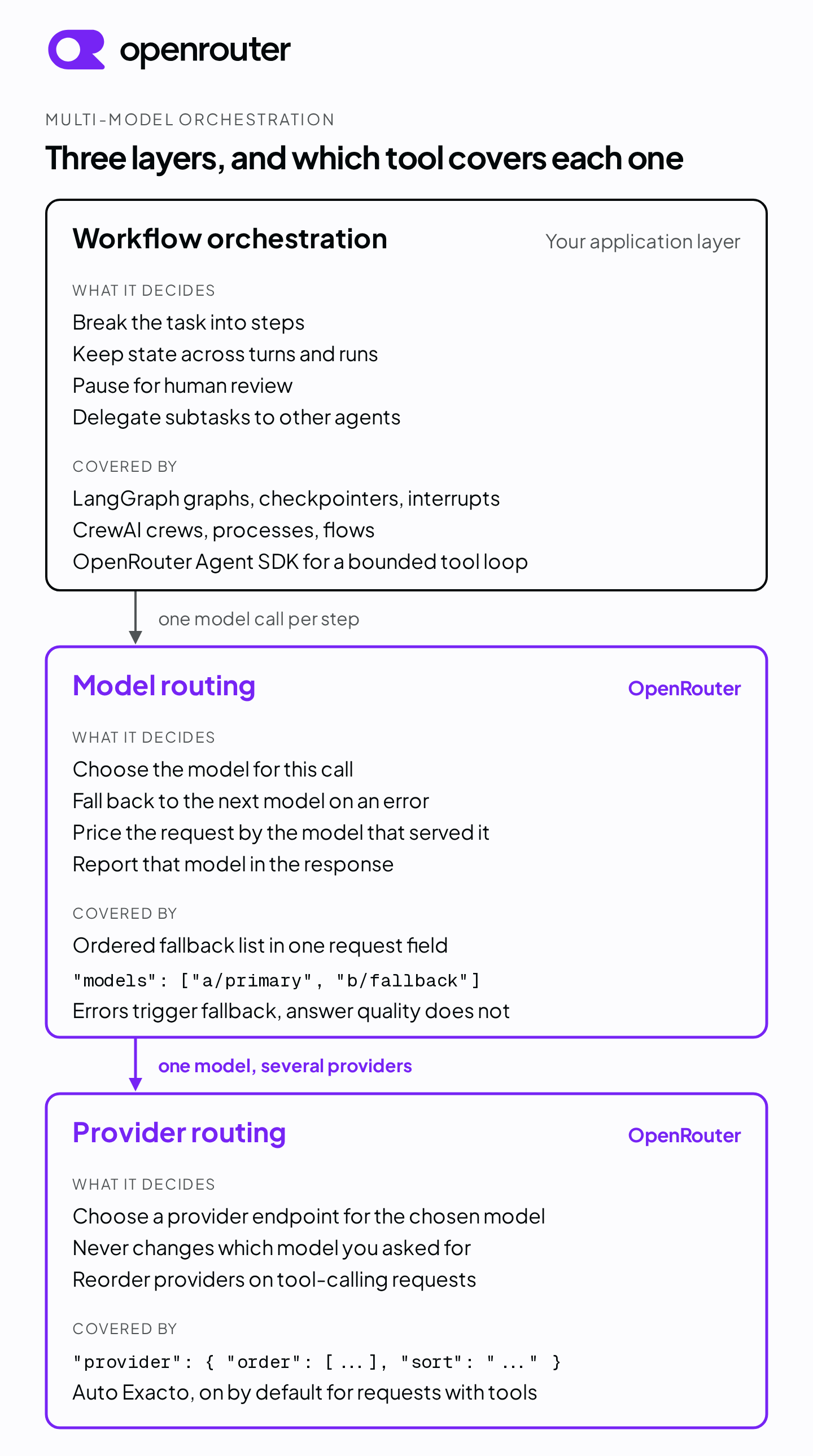
A workflow can need all three. Planning logic decides what to do next, model routing decides which model does it, and provider routing decides which endpoint serves that model. You don’t need the first layer to get the second two. A models list and a few if statements route between models without an agent framework.
LangChain and LangGraph
LangChain’s current documentation describes two products with different roles. LangChain is the agent framework, with abstractions and integrations for models, tools, and agent loops. LangGraph is the low-level orchestration runtime underneath it, focused on durable execution, streaming, human-in-the-loop, and persistence. You can use LangGraph without LangChain, and LangChain’s prebuilt agents run on LangGraph.
LangGraph models a workflow as a graph of nodes. You can mix deterministic, hand-coded steps with model-driven steps in the same graph. Persistence comes from two components. A checkpointer saves the graph state for a thread, which gives you conversation continuity, fault tolerance, time travel, and the foundation for human review. A store persists application data outside the graph state for long-term, cross-thread memory. The interrupt() function pauses a run at any point in a node, saves state through the checkpointer, and waits for you to resume it with a Command, so a person can approve, edit, or reject a step before the run continues.
The cost of that control is that you describe the control flow yourself. Each node, edge, state field, checkpointer, and interrupt is code you write and maintain. If you need a multi-step pipeline where every node is inspectable and resumable, LangGraph gives you the structure. If you need a model call with a fallback, it’s more than the job requires.
CrewAI
CrewAI’s documentation describes two building blocks. Crews are teams of agents, each defined with a role, a goal, and a backstory, that work through assigned tasks. A crew runs tasks in a sequential process, where each task’s output becomes context for the next, or in a hierarchical process, where a manager model or manager agent assigns and coordinates the tasks. Agents can delegate to each other when allow_delegation is enabled, and each agent has a max_iter limit, which defaults to 20, and an optional max_execution_time.
Flows are the structured, event-driven layer around crews. A flow defines the steps, the state that moves between them, and the control flow, including conditional logic, loops, and branching. Each flow instance carries a state object with a unique ID that persists for the run. CrewAI’s introduction positions flows as the backbone of an application and crews as the units of work inside a flow.
CrewAI’s model is closer to a task description than a graph definition. You spend more of your effort on role, goal, and task strings and less on connecting nodes. That’s a different tradeoff from LangGraph rather than a smaller version of it. Crews leave the agents room to decide how to complete a task, and flows are where you take that control back.
Comparison
| LangChain and LangGraph | CrewAI | OpenRouter direct | |
|---|---|---|---|
| Built for | Graph-based orchestration with explicit state, persistence, and human review | Role-based agent teams inside event-driven flows | Choosing a model per call, error-driven fallback, and provider routing |
| Multi-model support | Yes, one model object per node or agent | Yes, one LLM per agent, crew, or manager | Yes, a models list per request |
| Planning, memory, and delegation | Yes, explicit in the graph, checkpointer, and store | Yes, through agents, processes, and flow state | No, routing only |
| Streaming | Yes | Yes, at the crew level with stream=True | Yes, per request |
| Human review | interrupt() with a checkpointer | Flow logic you write | Not provided |
| What you write | Nodes, edges, state schema, persistence config | Agent, task, crew, and flow definitions | A request body |
OpenRouter-native routing
“Native” here means no framework. You send a request to https://openrouter.ai/api/v1/chat/completions, list your models in priority order in the models parameter, and we handle the rest. If the first model returns an error, we try the next model in the list. By default any error can trigger a fallback, including context length validation errors, moderation flags for filtered models, rate limiting, and downtime. If the fallback model also returns an error, we return that error. We price the request using the model that ultimately served it, and the response model field tells you which one that was.
Fallback reacts to errors. It doesn’t evaluate whether the first model’s answer was good. If you want a stronger model to review a weaker model’s output, that’s a second step in your code, not something the models list does for you.
Take a two-step pipeline that drafts with one model and then reviews the draft with a different one, falling back at each step if the first model returns an error. Written against OpenRouter directly, that’s one function and two models lists.
import os

import requests


def route(models: list[str], prompt: str) -> tuple[str, str]:
    response = requests.post(
        "https://openrouter.ai/api/v1/chat/completions",
        headers={"Authorization": f"Bearer {os.environ['OPENROUTER_API_KEY']}"},
        json={"models": models, "messages": [{"role": "user", "content": prompt}]},
        timeout=120,
    )
    response.raise_for_status()
    body = response.json()
    return body["choices"][0]["message"]["content"], body["model"]


draft, draft_model = route(
    ["anthropic/claude-sonnet-5", "openai/gpt-5.6-sol"],
    "Draft a one-paragraph summary of what a model fallback list does.",
)
review, review_model = route(
    ["openai/gpt-5.6-sol", "anthropic/claude-sonnet-5"],
    f"Review this draft for accuracy and suggest one improvement:\n\n{draft}",
)
print(f"draft by {draft_model}, review by {review_model}")
print(review)
To send a step to a different model, you change the list. Because our API is OpenAI-compatible, the same chat completions request shape works for every chat model in the catalog, and a model change is a change to one string. Models that serve other endpoints, such as embeddings, video, text to speech, or speech to text, use their own request shapes.
The same pipeline through LangChain uses the dedicated ChatOpenRouter model class. You create a model object per step, wrap each one with LangChain’s with_fallbacks so a failed call retries on the next model object, and call the result through invoke.
from langchain_openrouter import ChatOpenRouter

drafter = ChatOpenRouter(model="anthropic/claude-sonnet-5").with_fallbacks(
    [ChatOpenRouter(model="openai/gpt-5.6-sol")]
)
reviewer = ChatOpenRouter(model="openai/gpt-5.6-sol").with_fallbacks(
    [ChatOpenRouter(model="anthropic/claude-sonnet-5")]
)

draft = drafter.invoke("Draft a one-paragraph summary of what a model fallback list does.")
review = reviewer.invoke(
    f"Review this draft for accuracy and suggest one improvement:\n\n{draft.content}"
)
print(review.content)
Both versions route the same two steps across the same two models with the same fallback order. The difference is where the fallback runs. In the direct version, we run it server-side within one request. In the LangChain version, the framework catches the failed call in your process and sends a second request. For agents built with LangChain’s create_agent, the framework also offers ModelFallbackMiddleware, which tries alternative models when the primary model fails. The framework version gives you model objects and a shared invoke interface, which is the structure you want once there’s a graph, a checkpointer, or a set of tools to manage. When there isn’t, it’s overhead.
Three things come with routing through us in either version. Every response includes a usage object with token counts and the cost in credits, with no extra parameter required, so you can see what each call cost before deciding whether a tiered setup is worth it. Prompt caching on supported models reduces the cost of repeated context. And when a request includes tools, Auto Exacto runs by default. It reorders the providers for your chosen model using throughput, tool-calling success rate, and benchmark data, so tool calls land on providers with strong tool-calling records without configuration on your side. Auto Exacto changes the provider order, not the model.
Direct routing doesn’t plan, keep state across turns, or decide which subtask goes to which agent. That’s the workflow orchestration layer, and a models list doesn’t provide it. The next step up isn’t always a full framework.
The OpenRouter Agent SDK
Between direct routing and a full framework sits our Agent SDK, the @openrouter/agent package. A chat completion is stateless. You send messages and get one response. Turning that into an agent means running a loop where the model requests a tool call, your code validates the arguments and runs the tool, the result goes back to the model, and the loop repeats until the work is done. The Agent SDK packages that loop into one callModel function.
You define tools with the tool() helper and a Zod schema, and the SDK handles validation, execution, and conversation state across turns. Stop conditions such as stepCountIs and maxCost bound the loop. Each condition is checked after a step completes, so maxCost stops the loop after the step that reaches the threshold rather than preventing that step, and by default the SDK then makes one more model turn to produce a final answer. Treat maxCost as a stopping rule, not as a spending ceiling. Streaming is built in, and you can plug in a remote MCP server as a tool source.
import { OpenRouter, tool, stepCountIs, maxCost } from "@openrouter/agent";
import { z } from "zod";

const client = new OpenRouter({ apiKey: process.env.OPENROUTER_API_KEY });

const result = client.callModel({
  model: "anthropic/claude-sonnet-5",
  input: "What time is it in Tokyo?",
  tools: [
    tool({
      name: "get_time",
      description: "Get the current time in a timezone",
      inputSchema: z.object({ timezone: z.string() }),
      execute: async ({ timezone }) => ({
        time: new Date().toLocaleString("en-US", { timeZone: timezone }),
      }),
    }),
  ],
  stopWhen: [stepCountIs(5), maxCost(0.5)],
});

const text = await result.getText();
console.log(text);
The SDK is written in TypeScript, with Python and Go ports kept in sync. It gives you a bounded tool loop with validation, streaming, and stop conditions. It does not give you a durable graph, a checkpointer, or a role-based crew.
For delegation within a single request, the openrouter:subagent server tool lets a model hand a self-contained task to a worker model mid-generation. The worker can be any model on OpenRouter. Each task is independent. The worker sees only the task description and keeps no memory between tasks. Server tools are in beta, and the API and behavior may change.
The SDK also covers human approval and persisted conversation state within that loop. A tool can set requireApproval to pause before it runs, and a StateAccessor persists messages, approvals, and tool results between callModel invocations. What it doesn’t give you is a durable graph with explicit transitions and checkpoints, or coordination across a team of agents. When you need those, that’s the point to move up to LangGraph or CrewAI.
Using OpenRouter underneath LangChain or CrewAI
You don’t have to choose between a framework and a gateway. You keep the framework’s planning, state, and delegation, and use OpenRouter as the model layer underneath it.
With LangChain, we maintain a dedicated integration. The langchain-openrouter package for Python and the @langchain/openrouter package for JavaScript give you a ChatOpenRouter model that you point your agents and graphs at. LangChain’s documentation currently marks the Python integration as beta.
from langchain_openrouter import ChatOpenRouter

model = ChatOpenRouter(
    model="anthropic/claude-sonnet-5",
    temperature=0,
    model_kwargs={"models": ["anthropic/claude-sonnet-5", "openai/gpt-5.6-sol"]},
)
A ChatOpenRouter object sends one model value. To use our server-side fallback under LangChain, pass the models list through model_kwargs, which the package spreads into the request body. Without it, fallback is the framework’s job, as in the with_fallbacks example above.
With CrewAI, you configure its LLM class with our endpoint. CrewAI’s LLM documentation lists OpenRouter as a provider that uses LiteLLM, so you install the crewai[litellm] extra, prefix the model slug with openrouter/, and pass our base URL and your key.
import os

from crewai import LLM

llm = LLM(
    model="openrouter/anthropic/claude-sonnet-5",
    base_url="https://openrouter.ai/api/v1",
    api_key=os.environ["OPENROUTER_API_KEY"],
)
The CrewAI example configures one model. Provider routing applies to every request, and changing which model handles a step is a change to the slug. Server-side model fallback applies only when the request carries a models list, and CrewAI’s documentation doesn’t cover passing that field. In both cases your graphs or crews keep working as designed, and the change to reach a different model is a configuration change rather than a new provider integration or a separate API key per model.
Choosing a layer
If your direct implementation starts accumulating state machines, resumable checkpoints, approval steps, and delegation rules, you’re building a workflow orchestration layer by hand, and a framework replaces code you’d otherwise design and maintain yourself. This is our editorial guidance, not a product guarantee, and it starts from the behavior your application has to own.
- Use OpenRouter-native routing when the workflow is already clear and you only need to choose a model per call, add a fallback list, or control provider routing.
- Use the OpenRouter Agent SDK when you need a bounded multi-turn tool loop with validation, streaming, and stop conditions, and don’t need a durable graph or a role-based crew.
- Use LangGraph when you need explicit state transitions, persistence, recovery, human review, or a mix of deterministic and model-driven steps.
- Use CrewAI when the work maps to specialist agents, task delegation, and sequential or hierarchical collaboration, with flows when the surrounding application needs structured state and control.
- Put OpenRouter underneath LangGraph or CrewAI when you want the framework to own orchestration and OpenRouter to own model access and provider routing, with server-side model fallback where the framework forwards a
modelslist.
Conclusion
Multi-model orchestration is three layers. Workflow orchestration is planning, state, memory, and delegation, and LangGraph and CrewAI are built for it with different tradeoffs. LangGraph gives you explicit graph control at the cost of writing that control yourself, and CrewAI gives you role-based agents and flows at the cost of leaving more of the execution path to the agents. Model routing and provider routing are what OpenRouter does, and we do them the same way whether a framework sits on top or not.
If you’re not sure which side of the line your project is on, try the smaller commitment first. Route a two-step workflow across two models with a models list before deciding you need a framework on top. When you’re choosing a model for either approach, the models directory lets you filter by supported parameters, including tools.
Frequently asked questions
Do I need LangChain or CrewAI to use more than one model?
No. If your only requirement is choosing a model for a call and falling back to another model when the first one returns an error, the OpenRouter models parameter does that in one request. Choose LangGraph or CrewAI when the workflow also needs planning, durable state, memory, human review, or delegation between agents.
How do I orchestrate multiple LLMs in one agent workflow?
Separate the layers. For planning, state, and delegation across steps, use an orchestration framework such as LangGraph or CrewAI. For choosing which model handles each call, send an ordered models list to OpenRouter and let us fall back to the next model when the first one returns an error. We also choose the provider endpoint for the model that serves the call. A workflow can use both, with the framework on top and OpenRouter underneath as the model layer.
Can I use OpenRouter with LangChain or CrewAI instead of choosing one?
Yes. LangChain has a dedicated ChatOpenRouter integration in the langchain-openrouter package for Python and the @langchain/openrouter package for JavaScript. CrewAI documents OpenRouter as a provider through its LLM class using LiteLLM. In both cases the framework keeps the orchestration and OpenRouter supplies model access and provider routing. Our server-side model fallback runs only when the request carries a models list, which ChatOpenRouter forwards through its model_kwargs argument.
Will adopting LangChain or CrewAI lock me into one model provider?
Not if you point the framework at OpenRouter instead of a single provider’s SDK. Both frameworks accept OpenRouter as a model provider, so changing which model handles a step is a change to a model string in your framework configuration rather than a rewrite of the provider integration. You keep access to every model on OpenRouter.
Does OpenRouter model fallback judge the quality of an answer?
No. Fallback is error-driven. When the first model in your models list returns an error, such as a context length validation error, a moderation flag, rate limiting, or downtime, we try the next model in the list. A response that succeeds is returned as-is, and the response model field tells you which model produced it.
References
- Model Fallbacks, OpenRouter
- Provider Routing, OpenRouter
- Auto Exacto, OpenRouter
- Prompt Caching, OpenRouter
- Tool Calling, OpenRouter
- Agent SDK and Stop Conditions, OpenRouter
- Subagent server tool, OpenRouter
- LangChain integration, OpenRouter
- LangGraph overview, Persistence, and Interrupts, LangChain
- ChatOpenRouter and Built-in middleware, LangChain
- Introduction, Flows, Processes, Agents, and LLMs, CrewAI
来源:OpenRouter:Announcements(RSS) · openrouter.ai